Your workspace at a glance
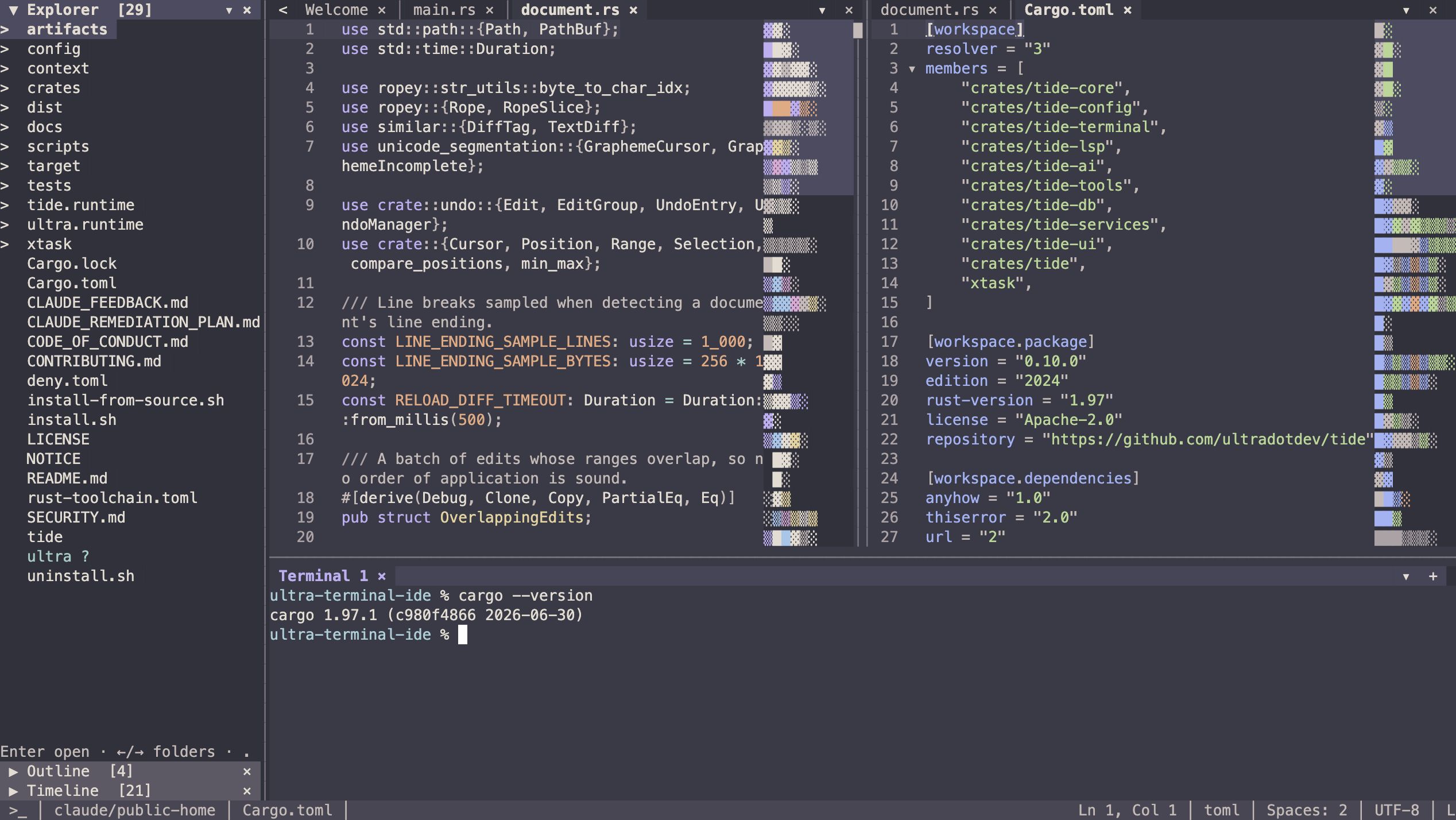
The workspace sidebar contains Explorer, Source Control, Outline, and Timeline. The Agents sidebar groups your provider sessions. Main panes hold files, diffs, SQL, terminals, and agent tabs. The bottom dock spans the main area between visible sidebars.
Either sidebar can move left or right. Moving one onto an occupied side swaps them.
Split and arrange panes
Split right with Ctrl+\ and down with Ctrl+Shift+\. Pane menus and palette commands let you move the active tab to another pane, choose a destination, or close a main pane.
Each pane owns its tab strip. Tabs keep their state when moved. An emptied source pane stays until you explicitly close it; the bottom dock is a separate region rather than a tab-move destination.
Add a tab
Use Ctrl+Shift+A or Cmd+Shift+A, or choose Add Tab from the palette. The pane picker offers files, terminals, SQL editors, and coding agents. Available providers depend on the CLIs installed on PATH.
Tab strips have close buttons, overflow menus, and wheel scrolling. Use Ctrl+Tab / Ctrl+Shift+Tab or Ctrl+PageDown / Ctrl+PageUp to switch tabs.
Move between regions
- F6 / Shift+F6: next / previous visible workbench region.
- Ctrl+] / Ctrl+[: next / previous main pane.
- F7 / F8: next / previous main pane.
- Alt+1, Alt+2, Alt+3: first three main panes.
- Alt + arrow keys: focus a pane in that direction.
Many terminals send Ctrl+[ as Escape. Use F7 / F8 or Alt+1, Alt+2, Alt+3 if bracket-based pane navigation does not work in your terminal.
Inside a sidebar, region traversal lands on an accordion header. Up/Down moves through headers, Enter/Space toggles a section, Right expands and enters it, and Left collapses it. Escape returns to the header when content has no local Escape action.
Resize and restore
Drag the dividers to resize regions. Tab-strip controls collapse or restore sidebars and the dock. Tide saves widths, dock height, and requested visibility with workspace state.
In a small terminal, the Agents sidebar collapses first, followed by other regions as needed. Increase the terminal size to restore space. tui.mainRegion.minimumWidth controls the width reserved for main content.
Dialogs and unsaved work
Ordinary dialogs dismiss on an outside click. Save/discard decisions remain until you explicitly choose, so a stray click cannot discard a buffer. Keyboard and mouse actions use the same controls.
Further customization
Today's pane layouts and settings are available now. Plugins, UX mods, a dynamic interface, and custom workspace experiences are coming soon.