See what can reach what.
Understand which tools can run code, access files, use credentials, or connect to the network. Geiger collects the configuration; the skill explains it.
An Ultra.dev skill
Know what your AI tools can reach.
Your AI setup can do a lot. Geiger Gauge helps you understand what is installed, what it can access, and what deserves a closer look. Get clear next steps, with the evidence one click away.
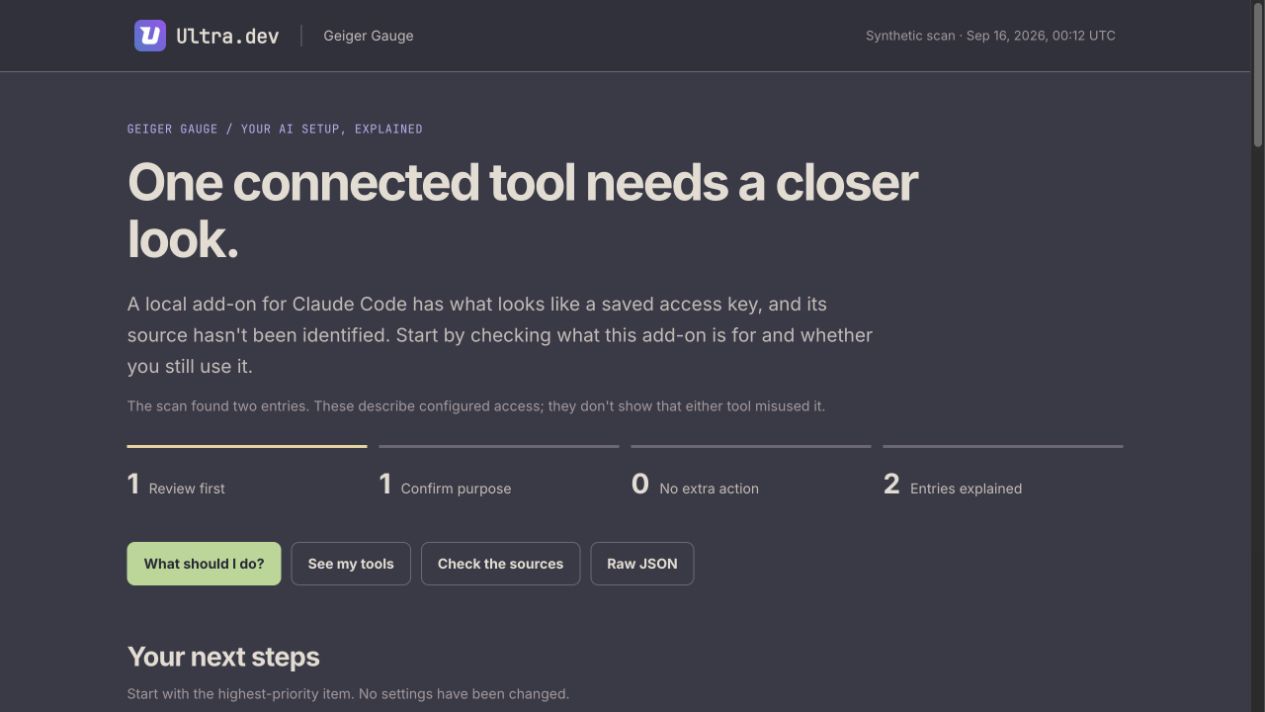
From inventory to understanding
Understand which tools can run code, access files, use credentials, or connect to the network. Geiger collects the configuration; the skill explains it.
Trace tools to their source repositories using public metadata. Uncertain matches and unidentified local scripts are clearly marked.
Get a short, prioritized list of things to review, with a concrete next step for each tool. Expand the evidence when you need the details.
Every report includes expandable evidence, source links, and the raw scan JSON. The HTML report works offline, with its fonts and branding built in.
Get started
Install the skill once, then ask for a review in plain language.
You’ll need Node.js 18+ and npx. Already have a Geiger JSON report? The skill can use it directly.
Download or clone the repository. Keep SKILL.md, assets/, scripts/, and references/ together in a folder named geiger-gauge.
~/.claude/skills/geiger-gauge/~/.agents/skills/geiger-gauge/For one project only, use its .claude/skills/ or .agents/skills/ folder instead. Reload your assistant if needed.
Use geiger-gauge to check my AI tools and tell me what needs my attention.
Your assistant runs the scan, explains the findings, and opens a local HTML report with the next steps.
A little more context
No. Geiger Gauge reports and recommends. It does not remove tools, edit your configuration, or rotate credentials. You decide which changes to make.
A finding describes a tool’s configured capabilities. It is not proof that the tool misused its access, and a clean report is not a security certification. The report explains the scan’s scope, gaps, and uncertainty.
The report files stay local and work offline. Your assistant processes the findings in its normal conversation context, and source lookups use public metadata online. A new scan may download Geiger through npx.
Geiger by Atomburst is the scan engine. Geiger Gauge is an Ultra.dev skill that interprets those results, checks source links, and creates the readable report. The skill’s tested scanner version is geiger-scan@0.3.0.
Built by Ultra.dev. Powered by Geiger by Atomburst.
Explore the source